Showing posts with label Home movie transfers. Show all posts

Friday, January 11, 2013

The Launch Of The Home Movie Legacy Project Radio Show


Radio Show #1 Jan 9 2013

Show Title:  The Launch Of The Home Movie Legacy Project

Host:  Rhonda Vigeant

Guest:  Phil Vigeant, Owner of Pro8mm;

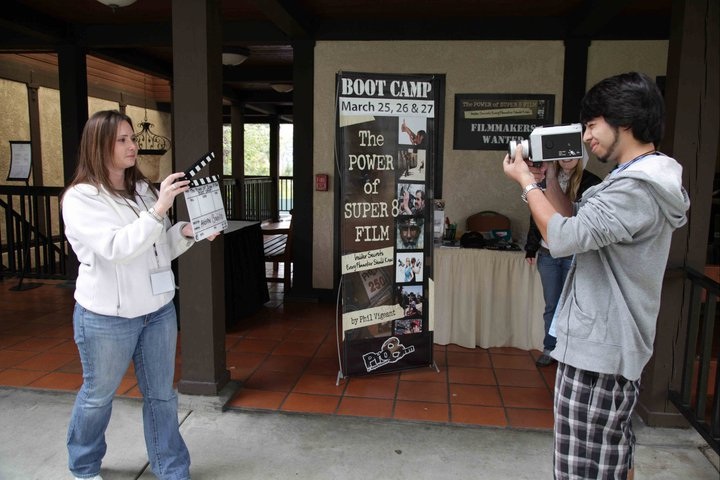
Author of The Power of Super 8 Film:  Insider Secrets Every Filmmaker Should Know


Summary:  The debut episode of The Home Movie LegacyProject was a content rich hour that addressed why home movies are such a vital part of our culture. They are the most organic form of physical evidence that we have about our families.  Home movies help us to shift our focus and transform our understanding of how our families lived.  They help us to access our memories in such a powerful way, often giving us huge breakthroughs so we can shift our focus and transform our understanding so we can move forward in our life.  They help us heal and connect with our departed loved ones. They create a legacy of story that we can hand down so our descendants will know how we lived.

The episode covered the evolution of the home movie, including formats such as 16mm film, regular 8 film, super 8 film, and the many formats of digital video. We talked about the digital dilemma we have in trying to bring all these many formats into our modern lives, so we can have access and share them in a modern platform, including sharing them on social media.


Guest Phil Vigeant is the business partner and husband of host Rhonda Vigeant.  Phil shared how his company, Pro8mm of Burbank, CA evolved, and the Super 8 film format being used by consumers to shoot home movies or a format widely used by students in film school, to one that provided solutions for the professional use of Super 8 film as a production format widely used in Hollywood.  The company was originally called Super8 Sound.  Founded in Cambridge, MA by Bob Doyle in 1973, Phil talks about the companies early professional jobs, including the famous commercial shot for Nike using the Beatles song  Revolutionin the early 80’s, to Paula Abdul’s “Straight Up” Music Video in 1988,  and Mariah Carey’s “All I Want For Christmas as You” in 1994.

This began the evolution of Super 8 to be used professionally for thousands of jobs in main stream media jobs, including major motions pictures such as Argo, Super 8 and JFK, hundreds of jobs for MTV and VHI, commercials for major brands, and dozens of television shows.

For more information about Pro8mm, go to www.pro8mm.com 

 The episode concludes with how all the studio work inspired their clients to go back to their own families home movies and first films often shot on Super 8 (people such as Steve Spielberg, George Lucas, Steven Soderbergh, Christopher Nolan, J.J. Abrams, Sam Rami, and Spike Lee) and why they wanted Pro8mm to handle their personal media assets the same way they have had their professional media assets handled, with the same level of integrity and on the same professional equipment.

 Rhonda and Phil wrap by sharing that this service is not just for the moguls, but for the masses, and that through the weekly radio show their goal is to teach and inspire people how to be head of their own studio, to give their home movie legacy the same red carpet treatment that famous people do and do it with urgency...before it’s too late!

 For more information to see related post, go to www.homemovielegacy.com

 The radio show airs every Wednesday at 4:00pm PST (6pm CST / 7pm EST) on the RockStar Radio Network 

Monday, July 16, 2012

5 Cool Things You Can (and Should!) Do with Your Home Movies!


Tech Talk: 5 NEW Cool Things You can (and should!) Do with your Home Movies!

We already share pictures with friends over the internet and upload instantly from our electronic devices. Why not do the same with your home movies?

The ability to bring cinema into the home for personal story telling changed us as a culture and continues to impact us today. These aren’t just “some old home movies” to watch on an old projector at Thanksgiving! They are the stories of our lives that can provide insight, enjoyment and humor to our families all year long. Technology has given us the ability to share our legacy in a way never before possible. Here are some ideas to get you started:

1) Upload your home movies to cloud via YouTube or Vimeo: Since being found in 2005, YouTube is the world’s most popular online video community, allowing millions of people to discover, watch and share originally created videos, and bring personal stories out of the living room and onto the worldwide web. It is free and easy to set up a YouTube or Vimeo site dedicated to your home movies. It is a simple as signing up with your email address, and start uploading! You will get a dedicated web page (i.e.: www.youtube.com/VigeantHomeMovies) that you can cut and paste virtually anywhere. Home movie clips can be set as private or public, with password protection if you only want certain family members to have access to them. If you are looking to share publicly, you can “tag” names, places, dates and events in the clip. These key words will come up in the Google search. Bonus! When a video clip lives on “the cloud,” it makes a great back up of your home movie files in case of a catastrophe. Floods, Fires, Hard Drive crashes; you name it, it has happened! By storing your files on the World Wide Web in the cloud they are protected even if a disaster occurs.

2) Burn Them to Disc- Blu-Ray with WiFi:
Since 2008, the cost of Blu-ray players has come down significantly, even for a very high quality player. The manufactures have added new features that make the players more universal. A new Sony BDP-S390, (is around $100) plays: BD-R (Recordable Blu-Ray) in perfect FULL HD 1080p at amazing quality, regular DVD, and has Wi-Fi capabilities with applications such as NetFlix, YouTube, Pandora and more built directly into the player! (This is another great way to watch that YouTube channel you just created on your television instead of the computer! J) Many of the newer players also have a USB 2.0 universal flash drive component, allowing you to play virtually any media such as music, photos and films, through your Blu-Ray player. If you are thinking about putting your home movies on Blu-Ray to share with the family, a new Blu-Ray player is essential to making these components run smoothly.

3) G-connect- Wireless storage for your iPad: It may not be feasible to carry your new Blu-Ray player around wherever you go, but if you have an iPad, you already know that the portability of this device is one of its greatest assets. In order to play your home movies on an iPad, they have to be recorded in an Apple TV (.m4v) file format. You then have to upload the file to your computer from your hard drive, connect the iPad, and down load the file. But at-last! G-Technology has just come out with a portable, wireless storage device for your iPad or iPhone. It is designed for “on-the-go” access to your content, by streaming it directly into your iPad using WiFi, without ever downloading the files to your computer or the iPad itself. Upload your home movies to the G-connect device (instead of a hard drive) and you are ready to go. Very cool! You will knock the socks off grandma with this one!
http://www.g-technology.com/products/g-connect.cfm


4) Edit: Imagine yourself as head of your own studio, editing your home movies to tell a specific story. Just like in the studios, the editor has the power to bring a story together in a creative and emotional way. With all the tools readily available on your home computer, it is easy to repurpose your original films into edited story telling.

A Story….Last Christmas one of my family members made me a 5 minute montage of all the family Christmas, starting with my grandparents in the 1950’s through my own adulthood. Edited to ‘Have Yourself A Merry Little Christmas,’ I saw 3 generations- my grandparents, my parents, and myself as children opening our gifts and playing with our new toys on Christmas morning. It was so fun to see how the traditions of our family Christmas have stayed true through so many years.

Today all Mac computers come with a program called iMovie, which allows you to cut clips and put your films to music. PC’s also typically come with some type of editing software such as Windows Movie Maker. For the more ambitious or experienced editor, you can purchase an editing software program such as Adobe Premier (PC editing) or Final Cut Pro X (Mac editing.) These have many more options for creating special effects that punch up your editing.

Creating your own short story or music video can be amazingly fun, easy, and a great way to re-purpose original content into funny, serious, or loving stories to share with your family.  Gift it to family members for birthdays or holidays. On a more serious note, edited clips of an individual could also been used devotedly to portray ones life and help families heal through hard times when a loved one passes. A montage clip of the person’s life can play at a wake or funeral, giving friends and family comfort through the moving images and happy times of a person’s life.

5) Funding: Technology has given us the ability to share our legacy in a way never before possible, and there couldn’t be a more exciting time. Many families are overwhelmed by the expense of treating their home movies like the studios would, even though in their hearts, they know that is what they would like to do. There are now several options to get funding for your home movie transfer!

Crowd Funding: There are now several websites where you create a fundraising campaign, called crowdfunding,’ to raise money for personal projects. Someone in your family may want to propose that everyone in the family makes a donation, which could be used to digitize everyone’s material, and then everyone in the family could get the entire library on a hard drive and edit their own story. Project goals might include organizing the entire library on a hard drive, iPad, Blu-Ray or uploaded to the cloud. Some examples of Crowd Funding platforms include Kickstarter.com, GoFundMe.com, IndieGoGo.com, ChipIn.com

Stock Footage: Could your family home movies be worth money? You bet they can! A single clip of 8mm film sold on Getty Images for over $5,000! How is that possible you may ask? Filmmakers are often looking for authentic 8mm clips that capture specific events, people, time periods and so much more so that they don’t have to go to the added expense of re-creating them. These clips are called Stock Footage, and are made available to the public by posting short clips onto the web. When transferred professionally, there is greater likelihood that your clips could be purchased and downloaded to be re-purposed in documentaries, films, television shows, and more.   As long as the films are your original material, your home movies could be the most valuable asset in your attic! Stock Footage platforms include GettyImages.com, Pond5.com, istockphoto.com and many more!

Thanks for reading 5 NEW Cool Things you can (and should!) do with your Home Movies!! As you may have figured out, this is just a short list among hundreds of applications for watching, editing, playing and funding your home movie project. So what are you waiting for!

Have a home movie idea you would like to share? Post it here or email us at info@pro8mm.com to share your idea in our next newsletter!


© Pro8mm 2012. www.pro8mm.com

Friday, October 28, 2011

The Master vs. The Playout: Archiving and Playing your Film the RIGHT Way

While digital has presented itself as great way to watch and edit film, it has also caused lots of confusion for home movie archiving. Having worked on thousands of home movie archiving projects over the past 3 years in high definition, the colorists at Pro8mm have had a few solid revelations about this process.

One revelation is that there has not been a solid solution to the quest to find one universal digital HD format that works well for both playing movies and for archiving them. Unfortunately, what is good for archiving is not the best format for easy playback. This means that in order to have the best access to your home movies you need to see it as two formats: one for preserving your movies and one for watching them. For name sake lets call one the “The Master” and the other the “The Playout.”

Rhonda with home movies on her iPad
A master digital file is going to be the best in terms of future protection of your images because a true master is going to provide you with data in the highest quality you might require and give you the flexibility of creating different playout versions.  The best digital master must serve your needs today, tomorrow and even to generate playouts for past systems. By having a master, you will always have a way of creating the highest quality playout file to a format that is most convenient for that times. For example, today it is ‘cool’ to watch your movies on your iPad or stream them to something like Facebook, but it was not that long ago we were using DVD’s and not that long before that we had VHS. Playouts will continue to change, but the great evolution towards HD mastering has stabilized. Hard drives may get faster and cheaper, but the fundamentals of HD are now securely planted.

The master is great as a film preservation medium but having the capacity to use it as a good playout is often very frustrating.  Many things must be in sync, coded correctly and you have to have the capacity to play large file types to use a master as a playout.  Computer files can be easily be down converted to what you need for a specific playout application.  This can be done while scanning or after you do some editing to the mater files. The cost to create these specific playouts is small. So the best system is to have both a master and playout files for the various ways you want to watch your films. At Pro8mm, we can create a specific playout file for DVD viewing, Blu-Ray, your iPad or even a format to stream your home movies on YouTube or Facebook.  These Playout files are specifically formatted for these devices so that you can have correct playback speed and framing for a playout that is different from the master.

SD Masters & Playouts
For almost 20 years we used Digi Beta Tape as the masters format for storing home movies. Over the past 3 years we have experienced the evolution to HD mastering and have seen first hand the great improvement HD mastering offers for Home Movie Archiving.

There are three areas of tremendous improvement with an HD File master over Digital Beta.

1) You no longer need Ghost Frames: Whenever you create SD video from film, you have to have 30 frames per second. This is how video works and there is no changing it in a Standard Definition NTSC system. If you shot film at 18 or 24fps, you needed to create the additional frames to make a 30 frames system work.  These extra created frames where often referred to a ghost frames because the where created out of two frames of the original film. In SD, they were rarely noticed because of the low resolution of the system.  The only time you could see these frames is if you played back the video frame by frame. You would then see these added frames that often blurred part of the images in the frame. However in high definition, because of the increased resolution the ghost frames are noticeable and can be seen when you playback the video. These extra frames did nothing but take up space, create unwanted artifacts, and reduce the quality of your master.   But they where needed to make the system work.  Today, with HD scanning we can store the images frame-by-frame in the digital mastering. We no longer need these extra ghost frames to make the system work. 
2) You now have more digital to define your film: The second  improvement of HD digital mastering is having more digits to describe your frames. Typically in HD we use a 1920 X1080 standard 16x9 Mastering format. In SD,  NTSC we used (640 X 480). With HD, there is 4 times more digital to describe the detail in every frame of film from SD.  This gives you the opportunity to store more color space and finer details about every frame. A lot of detail and color can fit in 4x more space.

Lacie Rugged Hard Drive

3) The Hard Drive: The last improvement is the storage of your images. The hard drive provides you with unprecedented access at very little cost. There is no longer a need to have those very expensive tape decks to maintain masters. With SD you needed multiple tape decks because different kinds of digit was put on different kinds of tape. If you wanted to have your data in both Digital Beta NTSC and for Europe Digital Beta Pal you would need two $40,000.00 tape machines to have access to your masters. Today with hard drives,  you can store both files on a single drive. Oh and by the way, you no longer need to have two masters because you can create both a Pal and NTSC payout from a single HD Master.   Second, you can compress the data, copy the data and manipulate the data with a simple consumer computer and the right software.  You can make 2 copies of the master for preservation, you can compress some files for theI internet to stream on Youtube, and you can make the grandparents a DVD.  You now have access to all your materials, both master and playout without the cost of expensive, multiple format tape decks. Hard drives will keep getting faster and cheaper, so you can migrate your data to what ever new system of storage presents itself.

To learn more about home movie preservation and digital asset management, we are hosting a free live event and teleseminar the second week of November called “Don’t Delete My Memories: The Home Movie Conundrum Made Simple.” Learn best practices for preserving and protecting your home movie digitally and understand the ways of using your home movie archive in modern applications. We will also be announce some amazing holiday promotions just for home movie preservation. Learn how to create great holiday gifts and memorable holiday events with your home movie archive.

Click here to Register for the LIVE event in Burbank, CA - Tuesday, November 8 from 7pm - 9pm

Click here to Register for the VIRTUAL event - Wednesday, November 9 from 4:30pm to 5:30pm pacific


Friday, April 29, 2011

Is There a Super 8 Life Style?

Wikipedia defines lifestyle in its simplest terms as “the way people
live”
Some lifestyles are easy to define.  Just watch an episode of  “Lifestyles
 of the Rich and Famous” or a National Geographic show that has a segment on some indigenous culture.  We see the lifestyle of the people pretty clearly.
In the 21st Century, particularly here in the West, there are more lifestyle options than ever before, and they are not all defined by socio-economics. Our choices for health and wellness, sexual orientation, products we use, how we transport ourselves, the way we socialize,  are choices that reflect our life style. The essence of our being.
To me, lifestyle is every day life. What we wear. What music we listen too. How we celebrate. I love to watch the everyday life of people’s home movies from the 50’s, 60’s, and 70’s shot on 8mm or super 8mm film. I can walk into our scanning suite any day of the week and get a nostalgia fix when I catch a glance of a birthday party, Christmas gathering, family BBQ, beach day or Disney outing. There is something so calming about the footage. Parts of it are always predictable. I identify with it. It slows me down from the constant pounding on my computer, ipad, or smart phone. It takes me back. It makes me feel good. It reminds me – I’m ok.
I like seeing the woman dress the way my mother dressed in that era. The shape of the eyeglasses, the dishes on the table, the cars.  I get really excited when I see a lamp that is the same style of one I grew up with, or a fabric pattern that was iconic in its day.
More and more I hear filmmakers I work with say that one of the things they like best about shooting on super 8 film is the “lifestyle behind it”. When I first heard people talking in this way, I thought they meant the surf culture or the skateboard culture, or even the adult film culture of which so much has been captured on 8mm film over the decades. So I started asking, what do you mean? What is the super 8 lifestyle?  Do you mean the lifestyle of the filmmaker who chooses super 8 as the way they want to tell a story or “Lifestyle Filmmaking shot on super 8 film”?
After giving this some thought, I think I have decided it is both. There is a certain type of filmmaker who defines the super 8 life style, and clearly chooses to tell stories on this medium. They are Independent. Hands On. Above average intelligence.   They like counter-culture. They are a Risk Taker. Personable. Humble. Modest. Generous. Grateful. Patient. And, amazingly creative.  The Super 8 filmmakers that I know who are the most successful with their super 8 filmmaking possess a majority of these qualities. And it is these qualities that really put these filmmakers in a league of their own when it comes to getting the shots that are romantic, playful, emotional, personal, intimate, and heartfelt.
Filmmaker George Manzanilla who shoots his spots for Billabong on Super 8 film says what he likes is that it is the emotional connection you are able to make with the subject when you shoot them on Super 8 film. It’ s a personal format. You get images you can’t get from a digital camera. The way he shoots changes the relationship the models. http://youtu.be/V4YyFSlP7aQ
Feature filmmaker Kurt Markus and son Ian were the entire crew for the super 8 documentary “It’s About You – John Mellencamp”. His narration in the film speaks about how having another person along to do the sound would have changed the dynamic. Then they would not be just father and son messing around in America with their Super 8 cameras. http://vimeo.com/16177978
Look at music videos such as  “Two is Better Than One” (Boys Like Girls) The performance piece is shot on the Red Camera.  http://youtu.be/cUMfdoIXv4U The love story is shot on super 8. It feels so real and touches emotions deep with in your soul. Or singer Harper Simons “Berkley Girl”  (shot by Ben Kutsko from The Masses)http://www.youtube.com/watch?v=VfXv6RBPEdI&feature=player_embedded
 Nowhere do we see this hankering for super 8-lifestyle filmmaking so prevalent as we do in weddings. While brides of the 80’s and 90’s were all about being shot on video, the past 10 years have shown a huge resurgence toward creating montage wedding footage on Super 8 film. Intimate. Personal. Playful. From simple low-budget weddings to Hollywood Celebrity Extravaganza Weddings, brides, grooms, and even the guests want to get in on the act. Check out the work of some of these amazing Wedding Filmmakers (and we have dozens more with just as awesome footage!) These are folks who have made a HUGE commitment to their craft, taking a risk (without video assist) at someone’s wedding that the footage being captured on 30-year-old cameras will do the job they were hired to do. This is not for the weak of heart. These wedding filmmakers personify the Super 8 lifestyle and personify the craft! Check out some of them and their amazing work.
The filmmakers themselves rave about the vintage charm.
Michelle Walker of Layer Cake Films on her website explains that as a super 8mm wedding film company, we create films that are original, offbeat, fun, and exciting. We strive to make custom stylized films that combine our generation’s style and sensibility with yesterday’s vintage film and retro feel. No melodramatic forced emotion! We are all about having fun and capturing the joy of your wedding day. We embrace offbeat couples.
Super 8 Film was invented as a home movie format to record the lifestyle of everyday living 50 feet at a time. Each roll is like a play list of 3 ½ minutes or less. A shot of life in  “reel” time.   Today we see a trend toward recapturing more simplistic, intimate story telling people are gravitating to simple stories. The cameras were designed for the average consumer, so that anyone could use it. I think we will see more and more filmmakers using Super 8 to capture this feeling of intimate lifestyle. The number of super 8 shots in commercials and in TV shows continues to grow with each passing. Full circle. Lifestyle filmmaking on super 8. Your own reality TV show.
How do you define the “Super 8 Lifestyle?  Please post your responses here!
By Rhonda Vigeant. Director of Marketing, Pro8mm www.pro8mm.com

You can also register for our FREE, teleseminar on Super 8 Lifestyle Filmmaking, Wednesday, May 11 at 4:30pm pacific (7:30pm eastern). Click here to read about the teleseminar and register: http://tinyurl.com/3sj6rhe

Friday, October 16, 2009

Why You Should Not Transfer Your Home Movies To DVD


WHY YOU SHOULD NOT TRANSFER YOUR HOME MOVIES TO DVD

As hundreds of people around the world prepare to attend Home Movie Day this Saturday, October 17th, I started thinking about how much misleading information there is on the internet from transfer houses about preservation and archiving your home movies. First and foremost is that a DVD does NOT preserve your film. A DVD is only a copy of your original film master by which you can watch your home movies. You cannot even edit a DVD transfer. As more and more people begin to think about putting their super 8, regular 8 or 16mm home movies into their Mac or some other edit program, so they can “do something” with them, I think it is important to think about why having your home movies scanned to DVD might not be the best choice. Most importantly, you never ever want to throw your original home movies away. This is your master that you will return to time and time again as scanning technology and applications change, and it needs to be cared for and protected.

The Center for Home Movies is a 501-C-3 not for profit organization that has done a tremendous job in raising the collective conscious of the public by having this annual Home Movie Day event worldwide. Home movies are our legacy, and offer a unique “you are here” view of decades past. They are an important part of personal, community, and cultural history. Go to their website www.homemovieday.com to find a Home Movie Day event near you. I guarantee that you will not be disappointed! The event is this Saturday at numerous locations around the world. Participation is simple: Bring one or more reels of your 8mm, Super8, or 16mm home movies to the event. They will inspect, and project them on a first-come, first-served basis. Damaged films will not be screened, but preservation specialists will offer expert advice on caring for at-risk materials. No films of your own? Just come and watch the show! It is free!

So as people begin to think about their archive, and perhaps select a reel or two to bring to Home Movie Day, this leaves the question, what should I do with MY home movies? You may no longer have access to a working projector, and more importantly, you would like to share your home movies with other family members. You may want to find out who else in my family has films. Maybe aunts, uncles and first cousins have films that show a different perspective or event than what your dad shot.

Pro8mm has scanned millions of hours of regular 8 , super 8 and 16mm film for the worlds most famous faces AND the general public. We feel so strongly about home movie preservation and that it should be done by a reputable company who will handle your one and only archive with integrity. Your home movies are just as import to you as the Hewlett/Packard’s, The Coppola’s. The Eagles, Van Halen, Bette Midler, Evan Picone, Estee Lauder (I could go on and on) are to them. Do you think that Richard Nixon would have sent his home movies to be transferred at Costco? To me this is like needing an organ transplant and finding a place that will do it at www.hearttransplants.com or the Kidney Depot. It is the same with your home movies. You only have one set of originals. So why not take the time to find out who is transferring them, what kind of experience they have, what kind of equipment they use and is the equipment safe for your film given its age and condition. Trust me, I have heard all the horror stories and many transfer facilities use primitive homemade equipment, some of which I have actually seen at trade shows. You could not pay me to put my film on anything that looked like it would scratch it, tear the perfs or chew the film!

Some places offer home movie transfers to DVD’s very cheap on equipment that only cost a few hundred dollars. We scan home movies on a one million dollar piece of equipment that was originally bought to do production work and documentary work of super 8 and regular 8 film. Your home movies are treated the way any professional production would be treated. Nothing drives me crazier than people who have the attitude why go to all that trouble .. “well it is just some old home movies” . I think people feel this way because your typical cheap transfer looks so bad compared to the original film which looks so incredibly good projected on a big screen. Well, here is a clip that I put up on FACEBOOK of “just some old home movies” from the 1940’s that were my grandfathers. www.vimeo.com/6974965 I had no idea that he was on the Board of Directors at The Blue Hill Credit Union, or that my great grandmother Rachel was so shy when the camera was on her. I never “got that” from the stills I had seen of her. My relatives went absolutely CRAZY! They loved it. Now I am getting my family to help me tag who these people were. Just think…The Power of Home Movies and the power of the internet. In order to do this though, your film has to be encoded to a file format not DVD. Films that are scanned as files can be used in an edit program on a Mac or PC, and, you can create stills from you film clips.

If you think having your home movies scanned by a professional motion picture company, here is what I suggest.

Set a budget. even as small as $100 -$200 dollars
Scan to file format only what you budgeted for. I would go for best quality , not quantity.
Share this high quality scan with your relatives to see if family members would like to share the cost and pool their films together to create a family archive. I think you will be surprised how many people might be interested in contributing
Do not feel that you have to scan everything at once. For my family, we scan an hour a year. You can also edit little clips and put them up for special occasions; For example, for my daughters 25th birthday, I put on FACEBOOK her 3rd birthday shot on Super 8 film. It was the greatest gift!
No matter where you scan, please take the time to find out the following by asking the facility these questions:

Find out what kind of equipment the facility has. Is it a film chain where they video tape your images as it goes through a projector. If it is, it will never render the quality that is on your original film. Or is it a flying spot scanner that is sprocketless. These render superior quality to film chain or single image capture telecines, and allow you to color correct the film. Many Ranks have a daVinci color correction system. This is like photoshop for your movies . Flying Spot Scanners are especially ideal for shrunken or badly damaged film.
2. If it is a flying scanner, what kind is it and how old is it? Transfer technology has been progressing rapidly since the 1980. The newer equipment can make substantially better images form your film.

3. Who is doing the transfer? Is it a real company or a home based business? Is it a trained film handler or archivist, or is it a minimum wage employee without professional training that is paying more attention to the internet or cell phone then your transfe

4. Do you have a choice of one light (single pass) or full scene-to-scene color correction? One light is best economy. Full color correction offers best quality and is done at a 3-1 ratio.

5. Is the film cleaned first and how? Dirty film will render a dirty transfer. Do they have technology to minimize the appearance of dirt and scratches on your transfer, such as Y Front technology?

6. Do you have a choice of standard definition or high definition? Is the high definition a “native 1080” HD scan, or is it “up rezzed’’ in a computer. Many places will call your scan an HD scan but it is film that has been video taped with an HD camcorder.

7. What do you want to do with your home movies? Do you want to edit clips to put up on Facebook, YouTube or on your iphone? Do you want to generate stills? Do you want to over-lay audio to take oral histories from family members? If so, then you do not want to transfer to DVD. You want to put them in a file format on a hard drive.

Whatever you decide, take the time to do the research. Think about how you want to share the movies. The internet now makes this so easy and so much more fun. You only have one archive. Preserve it for yourself, and for the future! And remember. Never throw away you original film! (c) RhondaVigeant, owner Pro8mm, October 2009 www.pro8mm.com

Monday, March 17, 2008

PRO8mm Now Offers 3 Distinct Scanning Systems


Pro8mm Offers 3 Distinctly Different Scanning Systems
* Millennium 2 (HD)
* Y-Front
*Rank


Beginning in March 2008 Pro8mm will begin offering 3 distinctly different Scan Systems. This will allow customers to choose between maximizing the Quality or the Economy of their transfers of 8 and 16mm film. Clients can custom build their transfers from the base price of each of our three systems by choosing which scanning system is best for them, Rank, Y-Front, or Millennium II HD. Then they can select options such as one light vs. full scene to scene color correction, scheduled vs. unscheduled, and from a variety of mastering formats, including hard drive. Each of these elements determine the per hour price. Additionally, options such as simul master, sync interlock, time code, a frame, and power windows are also part of the menu of choices.

For Maximum value, quality and efficiency, our extremely popular “ALL INCLUSIVE DISCOUNT PACKAGES” bundle together film, processing, prep and clean and transfer at one discounted price. These packages will be offered on The Y-Front and MM II. Purchased this way, scans on our new MM II scanner start at just $82 more for a 4 roll package than from under the old pricing ($278 for SD vs. $360 for HD) an unbelievable value for the quality and technology!

Our three scanning systems represent the progress in scanning technology over the past 30 years. Pro8mm has always been committed to offering state-of-the art products and services for our clients. Each scanning system we offer shows our alignment to the progression of scanning technology. Maintaining these older systems allows us to offer the widest selection of choices amongst all small format scanning companies so that we can accommodate the greatest number of client needs and budgets.

Rank Scan: This system uses a Digital Rank and daVinci Color Correction (4:2:2: Work Platform). This was our main system just 2 years ago and produces great images from Regular 8mm and Super8 mm reversal Film. The discounted base rate for unscheduled and unsupervised transfers will be $150.00 per hour.

Y-Front Scan: This system uses an Ursa Diamond with Y-Front technology and daVinci Color Correction (4:4:4 Work Platform). The Y-Front’s dirt and scratch concealment will improve the look of any film, especially modern negative film stocks that have expanded latitude. The Diamond has expanded gamma color space that is critical for achieving an optimum result with negative film. All present Pro8mm/Pro16mm Packages are done on this system. Base rate $255.00 an hour.

MILLIENNIUM II Scan: Using our Brand New Millennium 2 Scanner and daVinci 2K color corrector (1920 x 1080 HD Work Platform), this new system produces the most premium scan possible. It includes Y-Front technology for dirt and scratch concealment. By working in HD we can more precisely manipulate the information in the scan process even for SD transfer. Base rate $450.00 an hour

*All Systems can handle all film types:
All Systems offer Unscheduled Discounts and the option of doing scene to scene or one light.
Call one of our project coordinators for your custom quote.